Feature · 02
Haptic timer
From 1 second to 5 minutes, a short haptic marks every second and a distinct completion cue marks the end, so you do not have to keep looking at your Watch.
iPhone and Watch
Choose 1–300 seconds
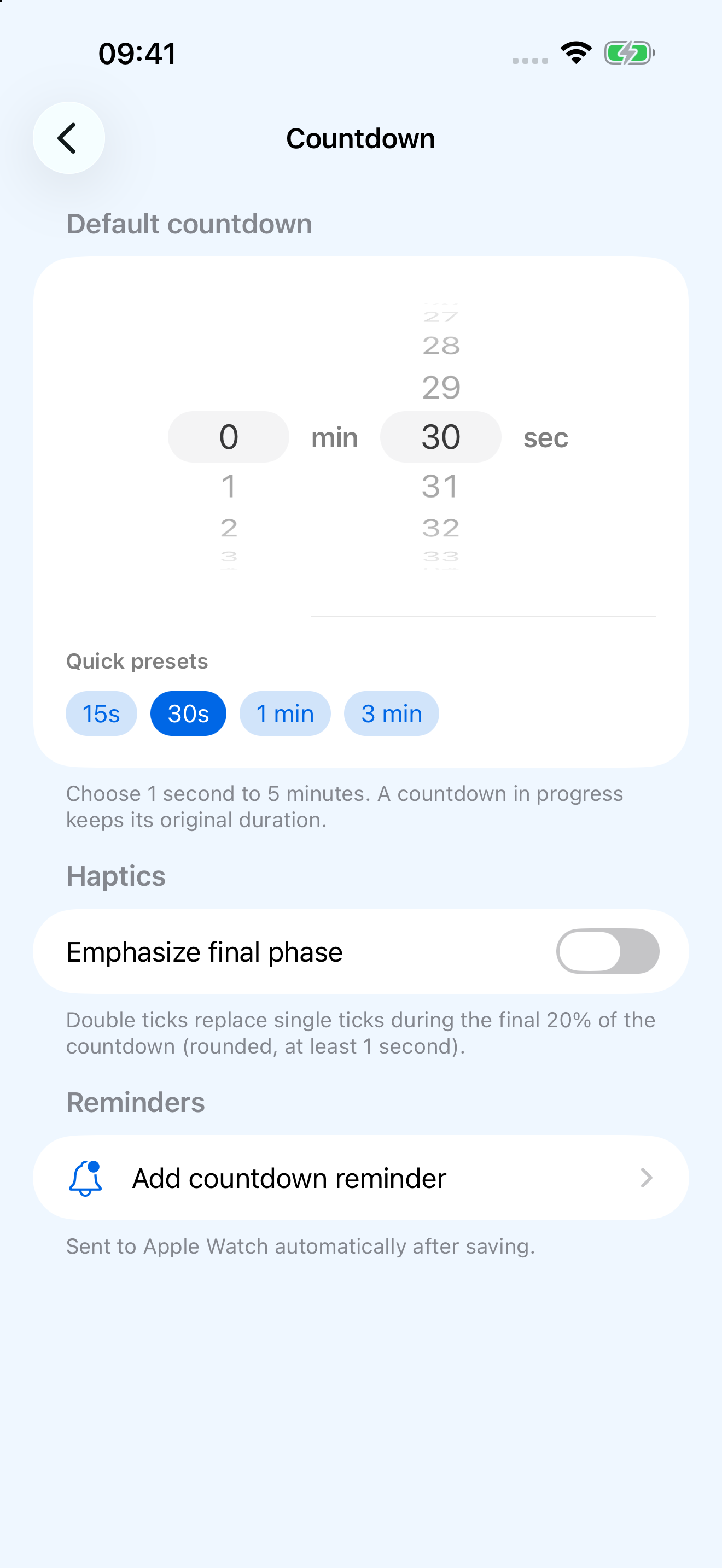
The default on iPhone is 30 seconds. Choose 15 seconds, 30 seconds, 1 minute, or 3 minutes, or set any duration from 1–300 seconds. After syncing, Watch uses this as its starting value.
On Watch, turn the Digital Crown or drag up and down to adjust this session in 1-second steps. The timer does not start automatically; tap “Start.”
Haptic rhythm
A haptic as soon as you tap Start
- Tap Start
Immediate short haptic - →
- Each elapsed second
One short haptic - →
- At zero
Completion cue
The first short haptic plays when you tap “Start,” followed by another each elapsed second. At zero, only the completion cue plays, with no extra tick, keeping the final second distinct from completion.
Optional setting
Emphasis covers the final 20%
With “Emphasize final phase” enabled, each tick during the final 20% becomes two short haptics. The emphasis window is rounded and always includes at least the last second.
| Countdown | Emphasis window | Each tick |
|---|---|---|
| 8 seconds | Final 2 seconds | Two short haptics each second |
| 30 seconds | Final 6 seconds | Two short haptics each second |
| 1 second | From the first second | Two short haptics |
Session controls
Pause without catch-up; exit without completion
Pausing preserves the exact remaining time. Resuming does not replay haptics missed during the pause. Exiting early returns to setup without a completion cue.
“Restart” on the completion screen restarts with the duration you just used, canceling any pending completion haptics first. “Back” keeps that duration for adjustment. The default synced from iPhone is loaded again only after you fully leave and re-enter the feature.
Shortcut
Double Tap to run it again after completion
On a Double Tap-capable Apple Watch running watchOS 11 or later, “Restart” is the primary action on the countdown completion screen. Tap your index finger and thumb together twice to start a new countdown of the same duration.
Supported models include Apple Watch Series 9 or later, Apple Watch Ultra 2 or later, and Apple Watch SE 3. For full restrictions and troubleshooting, see Double Tap compatibility .